
Create Google documents everyone can access.
Grackle Workspace lives directly inside Google Docs, Sheets, and Slides, guiding your team to build accessibility into every document from the start.
Trusted by education, government, business, and enterprise teams worldwide.


Show Transcript
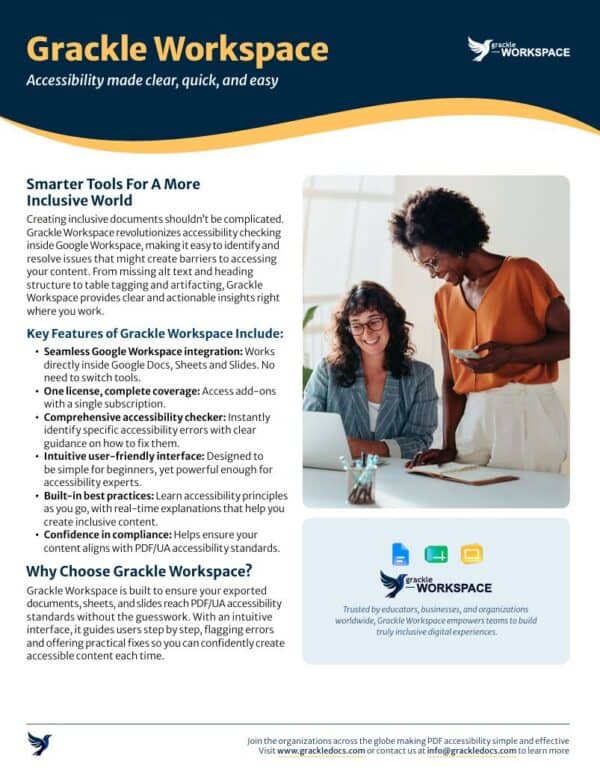
Grackle Workspace is the all-in-one solution designed to make your Google Workspace documents, presentations, and spreadsheets accessible for everyone. Whether you’re managing educational materials, government reports, or corporate content, Grackle Workspace ensures that your digital content is inclusive and compliant with global accessibility standards.
In today’s digital world, accessibility isn’t just a nice-to-have; it’s a must. Many organizations face challenges ensuring their documents meet content accessibility guidelines, but that’s where Grackle Workspace steps in, simplifying accessibility for all your Google Workspace files with just a few clicks.
Grackle Workspace integrates seamlessly with Google Docs, Sheets, and Slides, providing real-time accessibility checks. It identifies issues against PDF/UA and WCAG standards, like missing alt text, improper heading structures, and color contrast problems, helping you make your content accessible step-by-step.
Unlike other accessibility tools, Grackle Workspace doesn’t just point out problems; it provides actionable solutions. With its easy-to-use interface, you can fix accessibility issues in real time, ensuring that your documents, presentations, and spreadsheets are compliant with PDF/UA and WCAG standards.
When your content is accessible, it’s usable by everyone, whether they’re visually impaired, relying on assistive technologies, or simply accessing your documents from different devices. Grackle Workspace ensures that your content reaches the widest possible audience while improving the overall user experience.
With Grackle Workspace, creating accessible documents, presentations, and spreadsheets has never been easier. Take control of your content’s accessibility and compliance today, making sure that everyone, regardless of ability, can access and engage with your digital materials.
Ready to get started? Let us guide you to digital compliance. Find us at grackledocs.com or email us at info@grackledocs.com today.
Seamless Google Workspace Integration
Works directly inside Google Docs, Sheets, and Slides. There is no need to switch tools or disrupt your existing workflow.
One License, Complete Coverage
Access your document accessibility add-ons with a single subscription. Simple to manage, scale, and deploy across your entire team.
Confidence in Compliance
Grackle Workspace is built to help your exported documents, sheets, and slides reach PDF/UA accessibility standards without the guesswork.
Smarter Tools For A More Inclusive World.
• One Licence, Complete Coverage
• Comprehensive Accessilibty Checker
• Intuitive User-Friendly Interface
• Built-in Best Practices
• Confidence in Compliance
Who is Grackle Workspace for?
Intuitive and Impactful
Guarantee Visual Content Inclusivity
Never let an unlabelled image slip through to production. This view inventories every image, chart, and graphic on the page, instantly flagging missing descriptions and guiding you to write proper alternative text.
Learn Compliance Principles As You Go
You don’t need to be an expert to create compliant work. Grackle provides real-time explanations and practical educational tooltips alongside every flagged error, naturally training your team over time.
Catch and Resolve Issues in Your Regular Workflow
Instantly identify specific accessibility errors as you build your content. Grackle scans your document continuously, keeping your work fast and uninterrupted.
Build Logical Heading Structures Natively
Enables your documents to possess a clear, navigable reading order. Grackle Workspace automatically reviews and flags heading hierarchies so screen readers can traverse your content seamlessly.
Format Complex Tables for Screen Readers
Row and column headers can be notoriously difficult to make accessible. Grackle structures and tags tabular data automatically, ensuring complex grids remain perfectly understandable for assistive technologies.
Strip Out Decorative Clutter
Easily designate decorative lines, borders, and background elements as “artifacts”. This prevents screen readers from announcing useless background noise, keeping the focus entirely on your core text.
Frequently Asked Questions
- What kind of document errors does the tool find?
The comprehensive accessibility checker identifies specific errors from simple issues like missing alt text and incorrect heading structures, to more detailed issues such as poor table tagging and missing artifacting, while providing clear guidance on how to fix them.
- Does one subscription cover everything we need?
Grackle Workspace offers one license for complete coverage. You gain access to our suite of Google Workspace add-ons with a single subscription, making it incredibly easy to manage and scale across your entire organization.
- How does Grackle Workspace help align our exported documents with compliance standards?
With an intuitive interface, Grackle Workspace guides users step-by-step, flagging errors and offering practical fixes. This process helps your exported documents, sheets, and slides reach PDF/UA accessibility standards.
Built for clarity. Sustained by expertise.
PDF/UA Standards Alignment
Our system is explicitly designed to help your final exported outputs meet international PDF/UA accessibility criteria without the guesswork.
Enterprise-Friendly Licensing
A unified compliance model provides access to all Google add-ons with a single subscription, ensuring predictable deployment across the enterprise.
Globally Adopted Ecosystem
Trusted by educators, businesses, and regulatory organizations worldwide to build digital experiences that leave no user behind.
Trusted by teams in
- Government
- Education
- Enterprise
- Healthcare
- Financial Services
Get started today with clear, quick, and easy accessibility.
Need to go Beyond the Basics?
