
Helps make every Word doc and PowerPoint accessible, without leaving Microsoft 365.
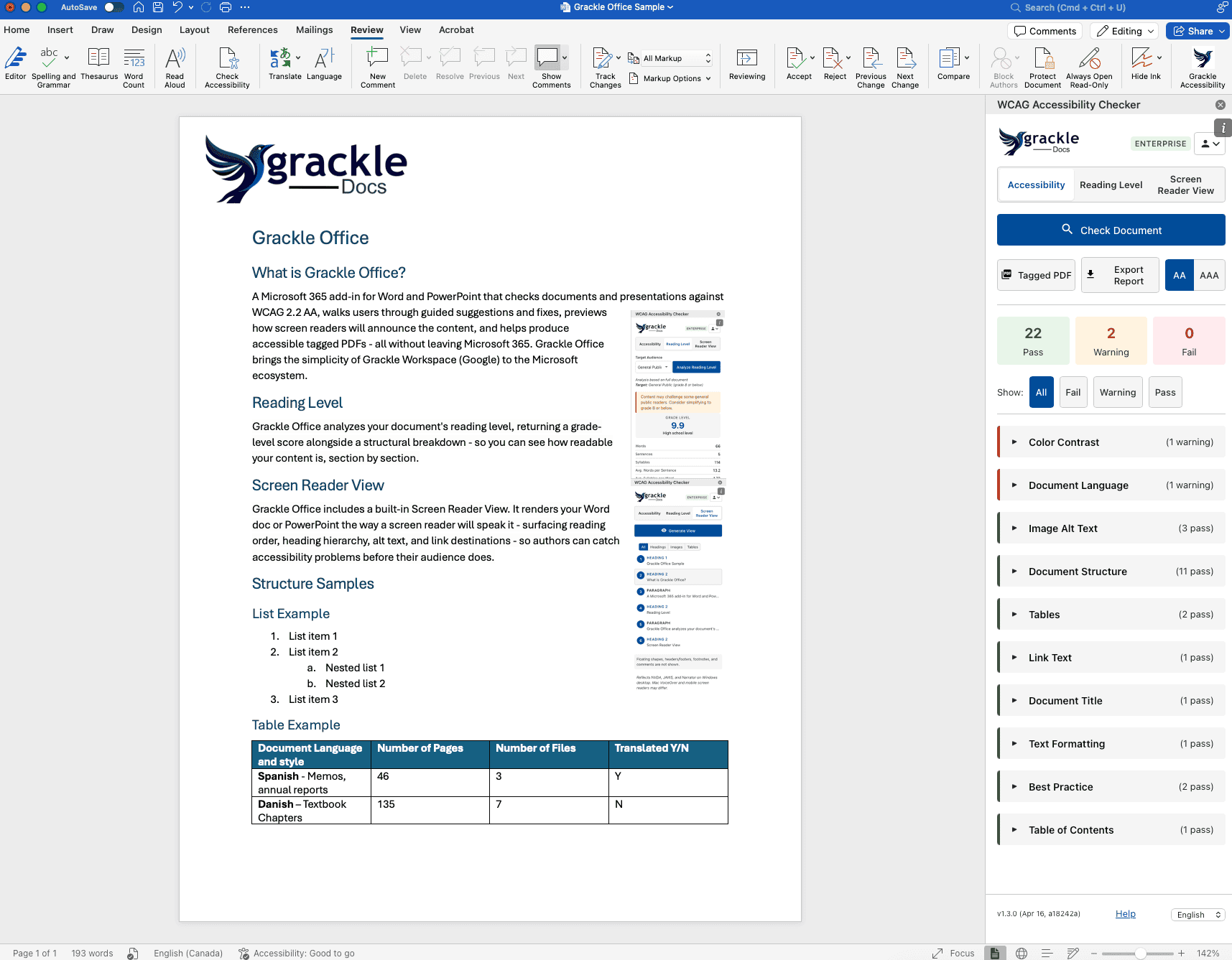
Grackle Office is the Microsoft 365 add-in that turns Word and PowerPoint into an accessibility-first authoring environment. Scan for WCAG 2.2 AA issues, follow guided fixes, and preview exactly how screen readers will announce your content—all in one integrated task pane.
Stop guessing. Start fixing. Just $20/month or $120/year per user.
Ready to turn accessibility compliance from a checklist into a completed action? Start scanning your Microsoft 365 files today.
Accessibility that lives where you work.
Grackle Office is built directly into Word and PowerPoint, allowing your team to fix accessibility bugs without ever leaving the document.
Guided fixes for every user.
Turn complex WCAG requirements into simple, actionable steps. Follow guided suggestions to resolve accessibility issues in real-time, ensuring your documents meet compliance standards without requiring specialized expertise.
Real-world screen reader previews.
Don’t guess how assistive technology will handle your content. Visualize the exact reading order used by NVDA, JAWS, and Narrator to ensure your document is truly inclusive.
Trusted by document creators and compliance teams across Enterprise, Education, and the Public Sector.
Who is Grackle Office for?
One add-in. Complete document accessibility.
Full-spectrum Automated Checks
Covers image alt text, heading hierarchies, table headers, color contrast, and more across Word and PowerPoint
Guided Remediation
Don’t just find problems, fix them. Our interface walks users through each change with modal dialogs and clear instructions.
Accurate Reading Order Preview
See and hear the exact sequence that NVDA, JAWS, and Narrator will announce, matching the true z-order of your slides.
AI-Placeholder Detection
Automatically flags auto-generated “AI descriptions” so you can ensure your alt text is meaningful and human-verified.
Multi-Locale Support
Available in English, French, Spanish, German, and Hebrew (with full RTL support).
Questions fréquemment posées
- Is my document content secure?
Yes. Grackle Office runs inside the Microsoft Office environment. Your document content never leaves your machine, there is no AI processing or server-side conversion involved.
How is this different from Microsoft’s built-in Accessibility Checker?
Grackle Office provides significantly deeper coverage (testing across dozens more specialized accessibility criteria in Word and PowerPoint than MS’s basic checks), guided remediation to help you fix errors, and an accurate screen reader preview that Microsoft doesn’t offer.
Does one license cover both Word and PowerPoint?
Yes. Unlike competitors who sell separate products for each application, Grackle Office is a single add-in that provides full functionality across both Word and PowerPoint.
Built by the experts in digital inclusion.
WCAG 2.2 AA Compliant UI
The Grackle Office task pane itself meets the same accessibility standards it enforces, supporting full keyboard and screen reader navigation.
SOC 2 Compliant
Our organization-wide security standards ensure your data is protected at every level.
Microsoft Marketplace Verified
Published and maintained as a verified Microsoft 365 add-in for seamless deployment.
Les équipes des pays suivants lui font confiance
- Gouvernement
- Higher Education
- Entreprise
- Soins de santé
- Services financiers