For someone navigating the web with a screen reader, an untagged PDF can be the difference between finding what they need and hitting a dead end: a job posting they can’t parse, a benefits form they can’t complete, a syllabus rendered as an unreadable wall of text. That’s the real cost of an inaccessible document, and it’s the reason PDF tagging exists as a discipline in the first place.
For the people responsible for producing that document, the cost looks different. If you’ve ever tried to increase the accessibility and usability of a PDF, you know the drill.
- Open Adobe Acrobat.
- Find the tagging panel nobody remembers how to use.
- Manually mark every heading, table, and image.
- Run the checker.
- Fix what it flags.
- Run it again.
Hours later, you may have made real progress. Or maybe you gave up, sent it to an outside service, waited, and paid.
That’s the process most organizations have lived with for years. Today, we’re changing it.
This work is hard. It doesn’t have to be. That’s the gap Grackle PDF closes. It builds the expertise your team doesn’t have time to develop from scratch directly into the tool, so real progress doesn’t depend on becoming an accessibility expert first.
Meet Grackle PDF
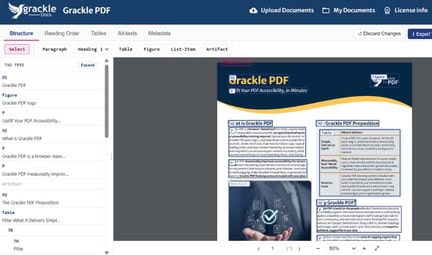
Canard pilet PDF turns PDF tagging into a guided, AI-assisted workflow: no Adobe Acrobat required, no specialized training, no waiting on an external vendor. Open your browser, upload your document, and let the tool do the heavy lifting.
Here’s what that looks like in practice:
- AI does the heavy lifting. Grackle PDF automatically tags headings, tables, and images, builds reading order, adds alt text, and generates metadata, all using AI layout detection.
- Save immediately, or refine further. For many documents, that’s the whole process: save and export right away. Want more control? Review and edit any of it before finalizing.
The result: easier tagging and PDFs that are more accessible and more usable, supporting your work toward PDF/UA and WCAG standards, produced by the team that already owns the content, not outsourced or delayed.
Why now
Digital accessibility isn’t a future consideration. It’s already showing up in procurement requirements, RFPs, and internal policy, backed by deadlines already in motion: the European Accessibility Act, ADA Title II, AODA, and Article 508, depending on where you operate and who you serve. Organizations that haven’t built accessible PDFs into their regular workflow yet are working against a clock that’s already running.
At the same time, three other things converged to make this launch possible, and none of them existed a few years ago:
- AI is finally ready. Fast, accurate document tagging used to require either a human expert or a lot of patience with imperfect automation. That’s no longer true.
- Accessibility and usability awareness has never been higher. More organizations understand that accessible, usable documents are a practical and often required part of doing business.
- These days, we live in a self-service world. Teams don’t want to wait on a vendor to do what they could do themselves with the right tool. That expectation, which has reshaped everything from analytics to design, has now reached PDF tagging too.
Grackle PDF sits directly at that intersection.
Try it yourself
Grackle PDF is available now as a fully self-service sign-up at app.gracklepdf.com, with a free 14-day trial. Tag your first document today, or join our launch webinar for a live walkthrough of the tool, including a real document tagged from start to finish.
Corporate licenses are also available, priced on application. A full license additionally provides access to the desktop version of Grackle PDF, for advanced PDF tagging and control.
We built this because our customers told us they wanted to do this work themselves. Now they can.
Grackle PDF is part of the GrackleDocs suite of tools built to increase the accessibility and usability of digital content. Learn more about GrackleDocs ou contact our team with questions.